
- Quick Start Guide for Gen1 S1070/S1080/S1090
- Pairing with the ASAHOM App
- Cutting & Reconnecting for Gen1 Waterproof Junction Box
- LED number setting for Gen1 Controller
- Cutting & Reconnecting for Gen 2 Waterproof Junction Box
- Quick Start Guide for Gen2 S1070/S1080/S2080
- Layout Setting for Gen2 Controller
- How to connect to Ethernet (Gen 2 S1080 S2080 only)
- Power extension cord
- Gen 1 T-splitter
- Power-T Connector
- Wire Clip / Screw Pack
- End Cap
- Gen 1 Waterproof Junction Box
- Wall-Mount Enclosure Kit
- Track-Mount Kit
- Gen 1 Light string extension cord
- Gen 1 Controller
- Fault Detection Module
- Gen 2 T-Splitter
- Gen 2 Waterproof Junction Box
- Gen 2 Light string extension cord
- Gen 2 Controller
- Dual Output vs. Single Output: Unlock Greater Flexibility for Your Permanent Outdoor Lights
- Why ASAHOM Permanent Outdoor Light Installations Over 200ft Need Extra Power Injection?
- The Simple, Secure Seal: Why ASAHOM's Waterproof Connectors Are a Game-Changer
- Unleash Your Creativity: How ASAHOM's Palette & Effect Combo Redefines Smart Lighting
- Why Your Outdoor Lights Stay Connected: The Truth About WiFi & Why ASAHOM Uses 2.4GHz
- Beyond Simple Splitting: How the ASAHOM T-Splitter Redefines Smart Lighting Control
- Redefine Your Night: The Power of Zone Control with ASAHOM
Timer
ASAHOM Permanent Outdoor Lights also feature a timer function, allowing you to schedule lighting actions exactly when you want them. Whether it’s turning the lights on at sunset, switching to a relaxing mode before bedtime, or powering off automatically late at night — you’re in full control. Create your own schedules with ease and let the lights run on your time.
Timer Function: Smart Control on Your Schedule
With the ASAHOM Permanent Outdoor Lights, the timer feature gives you full scheduling flexibility. You can set the exact day of the week, hour, and minute to trigger specific actions — such as turning the lights on or off, switching effects, or changing brightness. Whether it’s for daily routines, holiday decorations, or energy saving, the timer ensures your lights always perform exactly the way you want, at just the right moment.
The all-new timer feature breaks the traditional rule of setting only one time per timer. Now, a single timer can have multiple trigger times, giving you more flexibility to customize your lighting schedule.
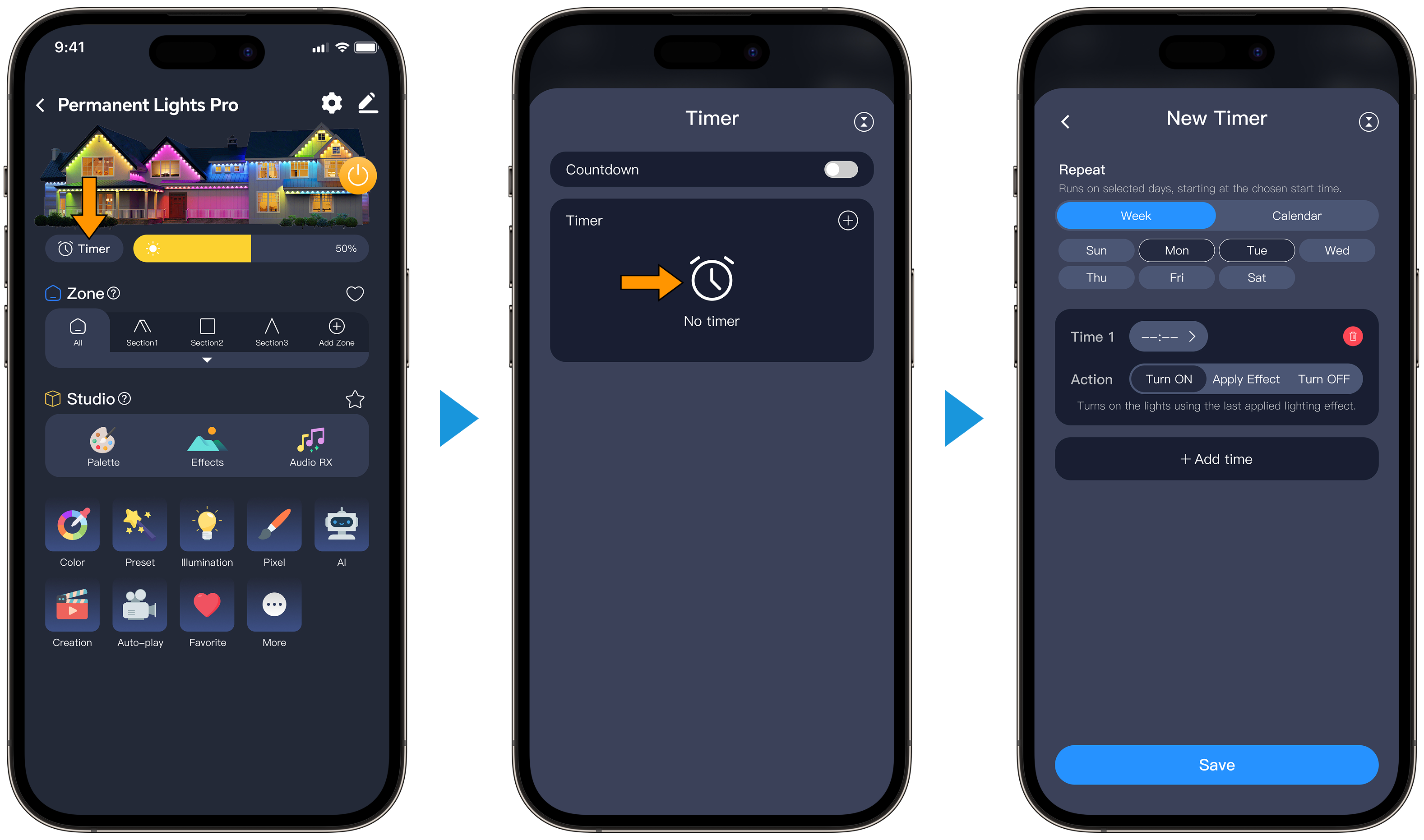
Interface Guide
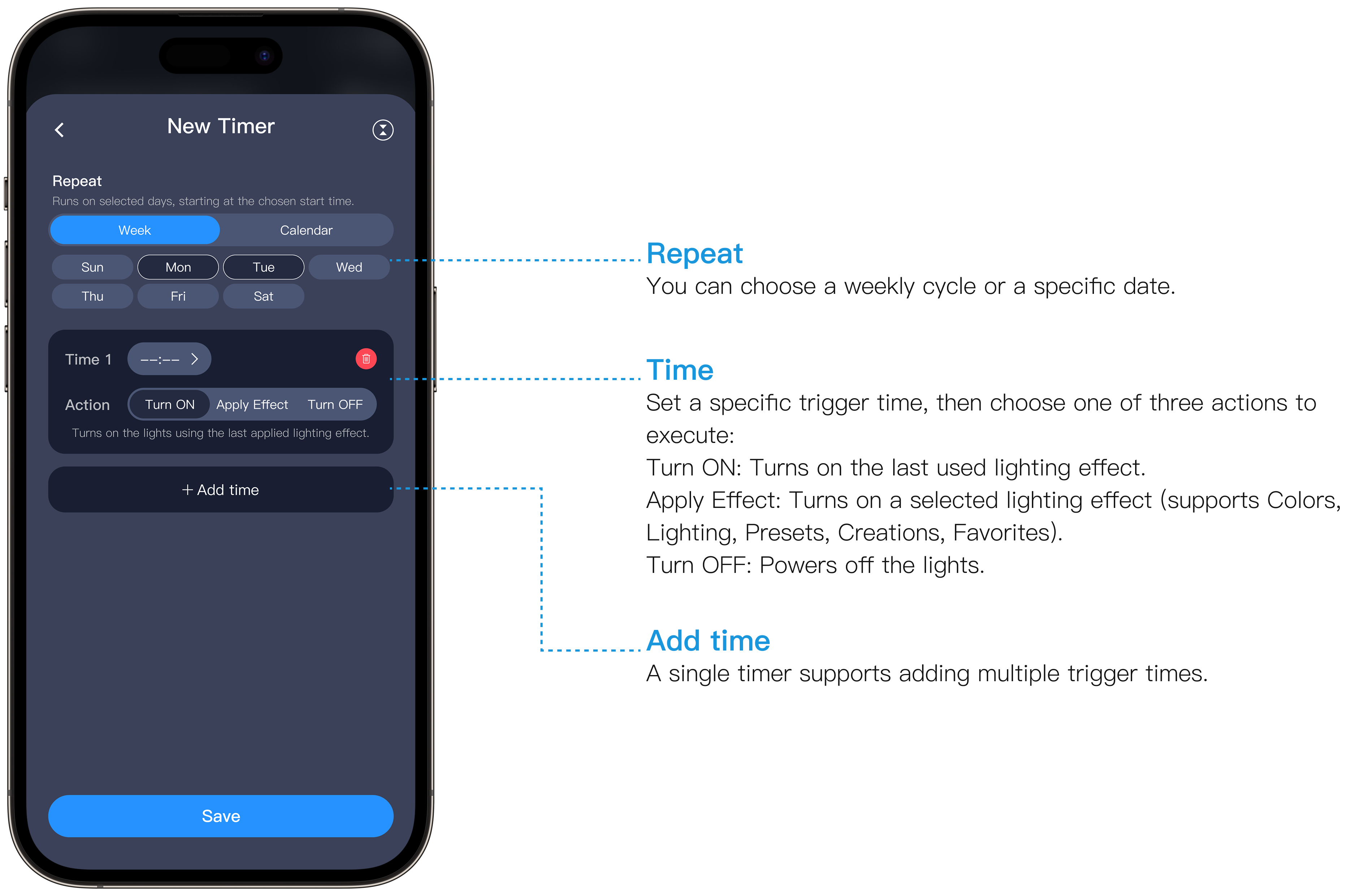
Repeat
You can choose a weekly cycle or a specific date.
Time
Set a specific trigger time, then choose one of three actions to execute:
Turn ON: Turns on the last used lighting effect.
Apply Effect: Turns on a selected lighting effect (supports Colors, Lighting, Presets, Creations, Favorites).
Turn OFF: Powers off the lights.
Turn ON: Turns on the last used lighting effect.
Apply Effect: Turns on a selected lighting effect (supports Colors, Lighting, Presets, Creations, Favorites).
Turn OFF: Powers off the lights.
Add time
A single timer supports adding multiple trigger times.
Countdown Timer: Auto-Off Made Easy
The countdown timer lets you set a specific duration for the lights to stay on. Once the time is up, the lights will automatically turn off — perfect for winding down before bed, saving energy, or simply adding peace of mind.

Updated on 18 May 2026
What are your Feelings?
Thanks for your feedback
- Choosing a selection results in a full page refresh.
- Opens in a new window.