
- Quick Start Guide for Gen1 S1070/S1080/S1090
- Pairing with the ASAHOM App
- Cutting & Reconnecting for Gen1 Waterproof Junction Box
- LED number setting for Gen1 Controller
- Cutting & Reconnecting for Gen 2 Waterproof Junction Box
- Quick Start Guide for Gen2 S1070/S1080/S2080
- Layout Setting for Gen2 Controller
- How to connect to Ethernet (Gen 2 S1080 S2080 only)
- Power extension cord
- Gen 1 T-splitter
- Power-T Connector
- Wire Clip / Screw Pack
- End Cap
- Gen 1 Waterproof Junction Box
- Wall-Mount Enclosure Kit
- Track-Mount Kit
- Gen 1 Light string extension cord
- Gen 1 Controller
- Fault Detection Module
- Gen 2 T-Splitter
- Gen 2 Waterproof Junction Box
- Gen 2 Light string extension cord
- Gen 2 Controller
- Dual Output vs. Single Output: Unlock Greater Flexibility for Your Permanent Outdoor Lights
- Why ASAHOM Permanent Outdoor Light Installations Over 200ft Need Extra Power Injection?
- The Simple, Secure Seal: Why ASAHOM's Waterproof Connectors Are a Game-Changer
- Unleash Your Creativity: How ASAHOM's Palette & Effect Combo Redefines Smart Lighting
- Why Your Outdoor Lights Stay Connected: The Truth About WiFi & Why ASAHOM Uses 2.4GHz
- Beyond Simple Splitting: How the ASAHOM T-Splitter Redefines Smart Lighting Control
- Redefine Your Night: The Power of Zone Control with ASAHOM
Creation
Creation is the creative hub of ASAHOM Permanent Outdoor Lights, allowing you to combine up to 6 lighting effects, set the duration for each effect and the transition time, and choose between sequential or random playback for a unique lighting experience.
How to Create a Creation Group?
Create from DIY
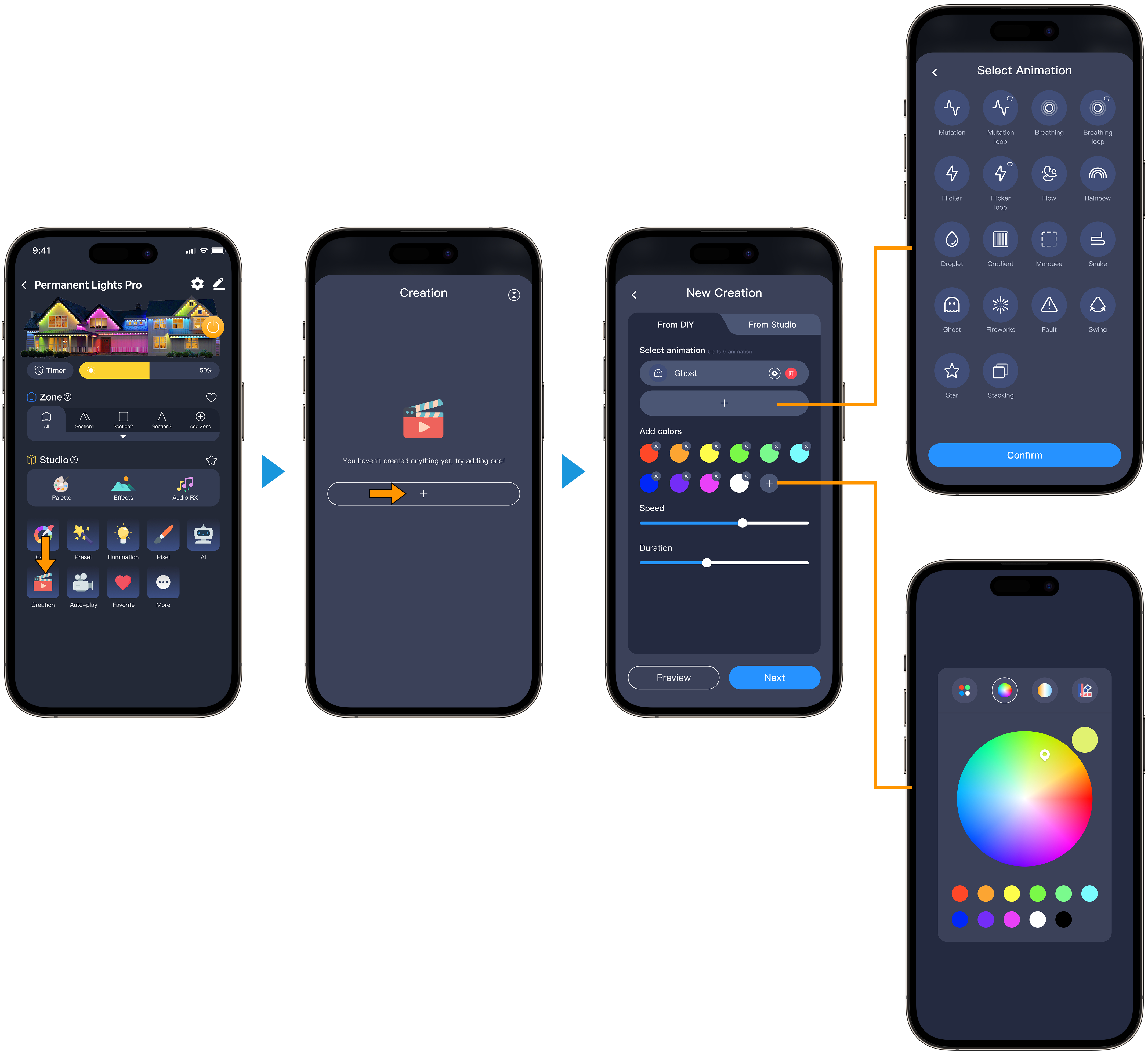
Open the Creation Panel Tap the Creation icon, then tap the “+” to start a new group.
Add Lighting Effects For each group, set:
Select Animation
Choose from 18 dynamic effects. You can add up to 6 effects to the loop.
Add Colors
Pick single colors from Color Blocks, the Color Picker, illumination, or Recommended Colors. You can add up to 8 colors to the loop.
Speed
Adjust the speed of the animation effect.
Duration
Set the duration for each animation effect.
Preview
Preview your settings.
Next
Proceed to the next step to save your Creation.
Create from Studio
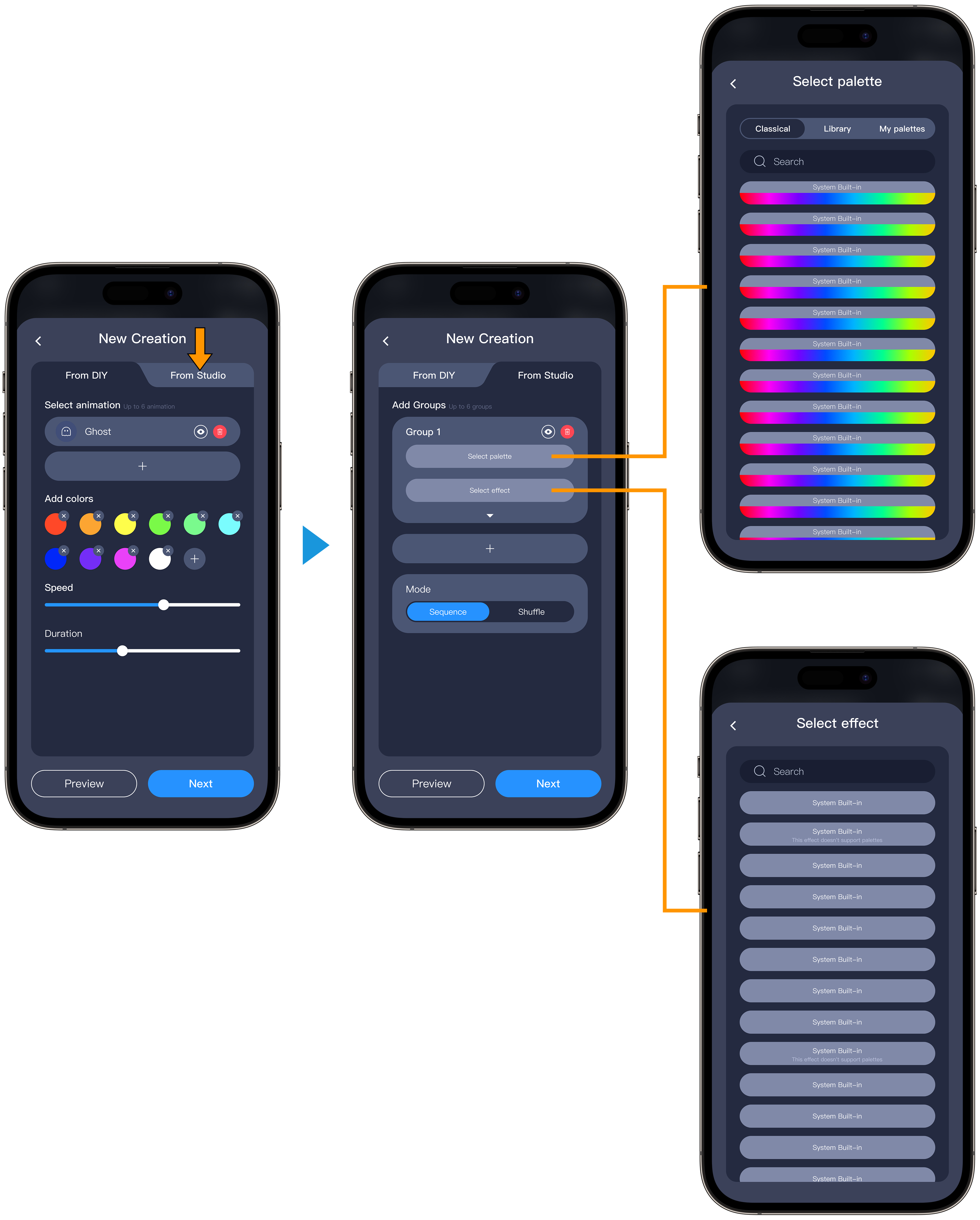
In "Create from Studio", you can combine a selected palette and effect to form a group. A Creation supports up to 6 groups.
Palette (palette color selection)
Effect (lighting effect selection)
Speed: 0–255 (each unit = 500ms)
Duration: 0–255 (each unit = 10ms) To preview, tap the paper plane icon at the top right. Add more effects to complete your playlist.
Select Execution Mode Select either Sequence (effects play in order) or Shuffle (random order) as your execution mode.
Save and Apply Tap Next, select an icon, name your group, and tap Save. Your new Creation group is ready to use.
Effect (lighting effect selection)
Speed: 0–255 (each unit = 500ms)
Duration: 0–255 (each unit = 10ms) To preview, tap the paper plane icon at the top right. Add more effects to complete your playlist.
Select Execution Mode Select either Sequence (effects play in order) or Shuffle (random order) as your execution mode.
Save and Apply Tap Next, select an icon, name your group, and tap Save. Your new Creation group is ready to use.
Pin, Edit, and Delete Creation
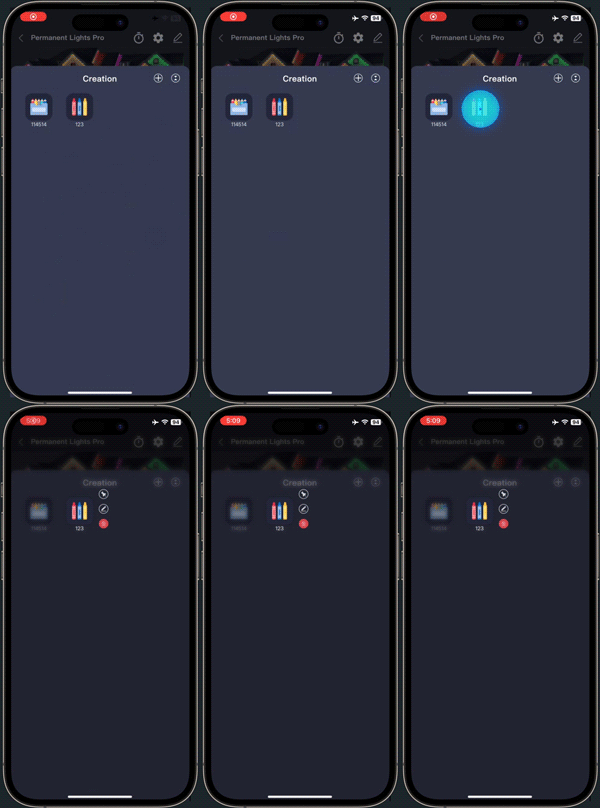 |
Long-press the icon of a saved Creation to reveal the Pin, Edit, and Delete buttons. Tap the corresponding button to pin, edit, or delete the group as needed. |
FAQs
Q1: How many effects can I add to one Creation?
A1: Each creation can include up to 6 lighting effects.
Q2: How many creations can I create?
A2: There is no limit to the number of creations. All creations are stored in the cloud, and only the currently active group is synced to the device.
Q3: How do I edit, delete, or pin Creation?
A3: Long-press the icon of a saved Creation to reveal the Pin, Edit, and Delete buttons. Tap the corresponding button to pin, edit, or delete the creation.
Q4: Can I customize the order of creations?
A4: You can use the Pin function to keep your favorite creations at the top of the list.
Q5: What should I do if changes to a Creation don't take effect?
A5: Be sure to tap "Save" after editing, and check that your network connection is stable.
Q6: Can I share my Creation groups with others?
A6: Direct sharing is not currently supported. You can share via screenshots.
Q7: Are creations synced across devices?
A7: Yes, creations are automatically synced across devices when using the same account.
Q8: Can different zones run different creations? A8: Yes. Each zone can run its own Creation independently, so you can personalize lighting effects for every zone just the way you want.
Updated on 18 May 2026
What are your Feelings?
Thanks for your feedback
- Choosing a selection results in a full page refresh.
- Opens in a new window.