
- Dual Output vs. Single Output: Unlock Greater Flexibility for Your Permanent Outdoor Lights
- Why ASAHOM Permanent Outdoor Light Installations Over 200ft Need Extra Power Injection?
- The Simple, Secure Seal: Why ASAHOM's Waterproof Connectors Are a Game-Changer
- Unleash Your Creativity: How ASAHOM's Palette & Effect Combo Redefines Smart Lighting
- Why Your Outdoor Lights Stay Connected: The Truth About WiFi & Why ASAHOM Uses 2.4GHz
- Beyond Simple Splitting: How the ASAHOM T-Splitter Redefines Smart Lighting Control
- Redefine Your Night: The Power of Zone Control with ASAHOM
Important! ASAHOM App New Version Update Announcement
We are excited to bring you a major version update of the ASAHOM app! This release is packed with powerful new features designed to give you even greater control and creativity over your permanent outdoor lighting. Whether you're a lighting enthusiast or a casual user, these enhancements will transform the way you interact with your lights.
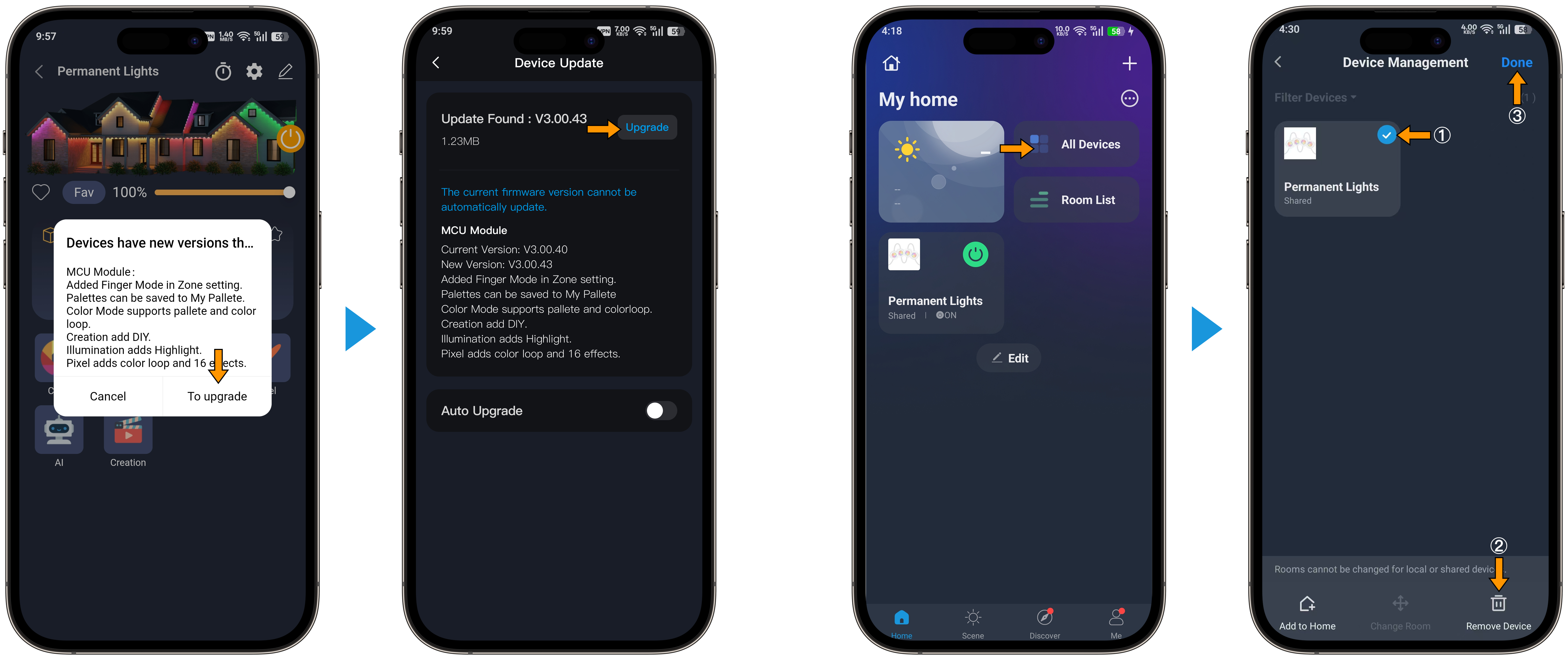
Important: Manual Reconnection Required after upgrade the firmware
Due to the scope of this major update, you will need to manually reconnect your devices to the network for the new features to take effect. Please follow these simple steps to complete the update after you upgrade the firmware:
-
Open the ASAHOM app and go to the Device Management homepage.
-
Tap on "All Devices" to view your connected lights.
-
Select your device(s) and choose "Remove Device" to delete them from the app.
-
Now, follow the standard pairing process to reconnect your lights. For detailed instructions, please refer to [Pairing-with-the-ASAHOM-APP].
-
Once the reconnection is complete, all new features will be fully available and ready to use.
_____________________________________________________________________
What's New in This Update
We've listened to your feedback and worked hard to deliver a more intuitive, feature-rich experience. Here's what's new:
1. Zone Control – New Finger Mode
We've added a brand-new Finger Mode to Zone Control. This innovative feature allows you to quickly and intuitively select and adjust zones simply by swiping or tapping with your finger on the zone map. It makes organizing your lighting areas faster and more natural than ever.
2. Palette – Save to "My Palette"
Now you can save your favorite custom color combinations directly to "My Palette" for quick access. Build your personal color library and reuse your unique palettes across different effects and scenes with just one tap.
3. Color Mode – More Flexibility
The Color Mode has been upgraded to support three distinct options:
-
Single Color: Choose any solid color from the spectrum.
-
Palette: Apply your saved custom palettes instantly.
-
Color Loop: Automatically cycle through a range of colors for dynamic transitions.
4. UI Optimization
We've refined the user interface throughout the app for a smoother, more intuitive experience. Navigation is now clearer, and controls are more responsive, making it easier to find and use all the powerful features at your fingertips.
5. Creation – New DIY Mode
Unleash your inner designer with the all-new DIY Mode in the Creation section. This mode gives you advanced tools to craft completely custom lighting effects from scratch. Combine colors, timings, and patterns to create lighting sequences that are uniquely yours.
6. Lighting Mode – New "Highlight" Effect
Introducing Highlight – a fresh lighting effect that accentuates specific areas of your installation. Perfect for drawing attention to architectural features, landscape focal points, or creating subtle depth in your lighting design.
7. Pixel Mode – Enhanced with Color Loop & 16 New Effects
Pixel Mode now supports Color Loop, allowing your pixel-level effects to flow seamlessly through a spectrum of colors. Additionally, we've added 16 brand-new dynamic effects to give you even more variety and visual excitement for your pixel-based installations.
Updated on 09 Mar 2026
What are your Feelings?
Thanks for your feedback
- Choosing a selection results in a full page refresh.
- Opens in a new window.