
- Dual Output vs. Single Output: Unlock Greater Flexibility for Your Permanent Outdoor Lights
- Why ASAHOM Permanent Outdoor Light Installations Over 200ft Need Extra Power Injection?
- The Simple, Secure Seal: Why ASAHOM's Waterproof Connectors Are a Game-Changer
- Unleash Your Creativity: How ASAHOM's Palette & Effect Combo Redefines Smart Lighting
- Why Your Outdoor Lights Stay Connected: The Truth About WiFi & Why ASAHOM Uses 2.4GHz
- Beyond Simple Splitting: How the ASAHOM T-Splitter Redefines Smart Lighting Control
- Redefine Your Night: The Power of Zone Control with ASAHOM
Studio - Effects
ASAHOM outdoor lights feature a powerful effects engine with:
-
142 built-in dynamic effects
-
Color palette integration for 30,000+ combinations
-
Real-time preview, so you see changes instantly
-
Customizable parameters like speed, intensity, and blending
-
Multiple selection modes: manual, random, and search
Whether it’s for parties, holidays, or daily ambiance, ASAHOM lets you create lighting that fits any mood perfectly.
Real-Time Preview: What You See Is What You Get
Instantly view effects in the App’s Current Effect section before applying them. Customize confidently with live feedback.
3 Simple Ways to Switch Effects

Manual Selection – Browse and tap any effect in the built-in list.
Random Selection – Tap the  icon for a surprise effect.
icon for a surprise effect.Search Selection – Enter a keyword to find your favorite effect instantly.
Fine-Tune Your Lighting
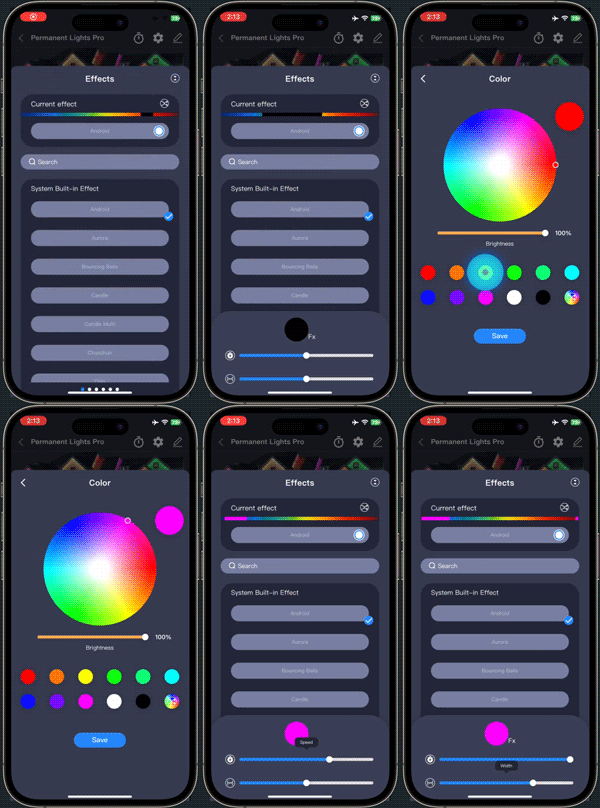 |
Tap the settings icon in Current Effect to adjust speed, intensity, palette blending, and more |
FAQs
Q1: Why doesn’t the selected color palette apply to my effect?
A1: 
Some effects do not support color palettes. Look for a note in the effect selector indicating whether a palette can be used.
Q2: Why doesn’t the light change when I select a new effect?
A2: This may be due to effect parameters. Try adjusting parameters like speed or intensity to activate the effect.
Q3: Why is my effect static and not dynamic?
A3: Effects like Percent Solid or Solid Pattern are designed to be static and will not change over time.
Q4: Why does the preview in Current Effect look different from the actual lights?
A4: Screen previews may have slight color differences. Also, the preview does not reflect your actual light count or zone settings.
Updated on 30 Oct 2025
What are your Feelings?
Thanks for your feedback
- Choosing a selection results in a full page refresh.
- Opens in a new window.